# Plan for Promoting Traceable Code Sources

# Background
On the internet, many technical blogs and articles incorporate code snippets to help readers understand technical concepts or document their analysis and understanding of large modules. However, due to version management and technological changes, many historical articles lack source information for the introduced code snippets, preventing readers from gaining a complete understanding of the ideas and affecting their learning experience.
After discussing this issue with ChatGpt, I was inspired to promote traceable code sources.
Introducing code snippets in blogs or articles without indicating their sources can lead to the following problems:
- Lack of references and citations: Not providing code sources makes it difficult for readers to locate and verify the accuracy and reliability of the code. Readers may not be able to identify the code's author, version, or other relevant information.
- Copyright infringement: Copying code from other sources without referencing or mentioning the original author or code source may constitute copyright infringement, violating intellectual property laws and ethical norms.
- Credibility and reproducibility concerns: Providing code sources enhances the credibility of the blog or article. Readers can refer to the original source to verify the code and obtain more contextual information. Moreover, if readers want to reproduce the code in their own environment, the code source can provide necessary guidance and dependency information.
To address these issues, it is recommended to provide code source information whenever introducing code snippets in blogs or articles. This can be achieved by adding comments, linking to code repositories, or citing the sources. This approach provides more comprehensive information, increases the credibility of the article, and respects the rights of code authors. :::
# Existing Differences
# Traditional Markdown Syntax
In traditional Markdown syntax, there is no built-in way to specify highlighted lines of code blocks. Typically, Markdown code blocks are used to display code without supporting the precise specification of highlighted lines.
However, some extended Markdown parsers or editors may offer custom syntax or plugins to support specifying highlighted lines within code blocks. These extensions may vary depending on different tools and plugins.
Here are some common Markdown extensions and tools that may provide functionality to specify highlighted lines within code blocks:
GitHub Flavored Markdown (GFM)
GFM supports using syntax like {highlight} in code blocks to specify highlighted lines. For example:```java {highlight=[1,3-5,7]} public class HelloWorld { public static void main(String[] args) { System.out.println("Hello, world!"); // Highlighted lines: 1, 3-5, 7 } }Markdown Extra
Markdown Extra is an extended Markdown syntax that supports similar highlighting line syntax to GFM. The specific syntax may vary depending on the tool; please refer to the Markdown Extra documentation for details.VS Code and other editor plugins
Certain editors, such as VS Code, provide Markdown plugins that allow specifying highlighted lines using specific syntax. These plugins usually use custom syntax or markers to achieve this functionality. The specific syntax and usage can be found in the plugin documentation.
Please note that the availability and specific syntax of these features depend on the Markdown parser, editor, or extensions you are using. It is recommended to consult the documentation of relevant tools to determine if they support specifying highlighted lines within code blocks and find the corresponding syntax or plugins to meet your needs.
- Github
- Github Markdown Some suggestions have been made about this: Allow to highlight lines in a code block (github flavored markdown) #42489 (opens new window)
- Github permalink Github provides a permanent link that supports highlighting and version information, which provides inspiration for this project. You can use Shift to select multiple lines, and then right-click to choose "permalink".
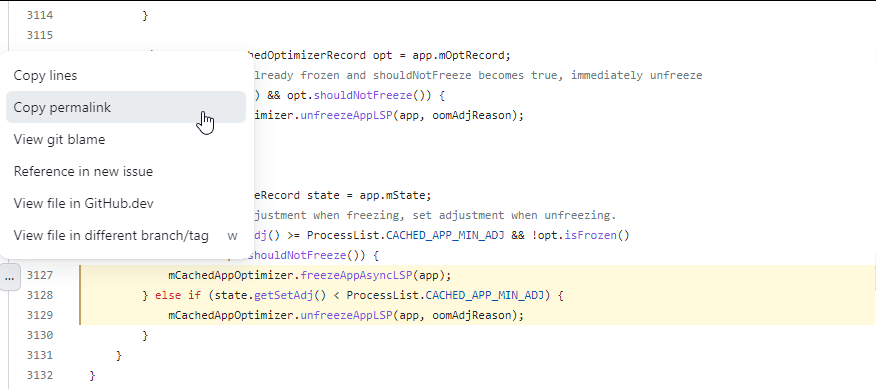 OomAdjuster.java#L3127-L3129 (opens new window)
# New Standard Definition
During discussions with ChatGpt about designing a new standard, the following ideas were continuously output:
- Design code blocks with introduced links Consider the following format:
```java [Link Name](Link Address)
// Code content
This way, a link can be added within the code block, and the link name will be displayed as clickable text that redirects to the specified link address.

* Specify both starting line and highlighted lines in code blocks You can consider the following format:

```markdown
```java {Starting Line-Ending Line} {Highlighted Line 1} {Highlighted Line 2} ...
Code content
For example, if you want to specify a Java code block with the starting line as line 3 and highlight lines 4 and 5, you can use the following format:
```java {3-} {4 5}
public class HelloWorld {
    public static void main(String[] args) {
        System.out.println("Hello, world!");  // Line 4 highlighted
        System.out.println("Welcome!");       // Line 5 highlighted
    }
}
In the above example, the starting line number is 3, the ending line number is empty, which means all lines from line 3 to the end of the code block. Highlighted Line 1 and Highlighted Line 2 represent lines 4 and 5, respectively.
Please note that this is just one example design, and the actual implementation may vary depending on the Markdown parser or editor you are using. It is recommended to refer to the documentation of the tools you are using to determine if they support specifying both starting and highlighted lines in code blocks and find the corresponding syntax or plugins to meet your needs.
# Implementation
# Complete Definition
```{language} {{start-line}-{end-line}} {{high-lines}} (url)
{code}
Example
- Complete syntax
```java {3125-3131} {3126-3130} (https://github.com/10cl/fwkdev/blob/android-13.0.0_r52/dev/src/frameworks/base/services/core/java/com/android/server/am/OomAdjuster.java#L3125-L3131)
        // Use current adjustment when freezing, set adjustment when unfreezing.
        if (state.getCurAdj() >= ProcessList.CACHED_APP_MIN_ADJ && !opt.isFrozen()
                && !opt.shouldNotFreeze()) {
            mCachedAppOptimizer.freezeAppAsyncLSP(app);
        } else if (state.getSetAdj() < ProcessList.CACHED_APP_MIN_ADJ) {
            mCachedAppOptimizer.unfreezeAppLSP(app, oomAdjReason);
        }
    }
* Effect ```java // Use current adjustment when freezing, set adjustment when unfreezing. if (state.getCurAdj() >= ProcessList.CACHED_APP_MIN_ADJ && !opt.isFrozen() && !opt.shouldNotFreeze()) { mCachedAppOptimizer.freezeAppAsyncLSP(app); } else if (state.getSetAdj() < ProcessList.CACHED_APP_MIN_ADJ) { mCachedAppOptimizer.unfreezeAppLSP(app, oomAdjReason); } }
# Compatible Option
Considering that many Markdown parsing tools may require some effort and have compatibility issues to support the new standard, it is also possible to achieve traceable code blocks through the original Markdown format. I encourage using this new approach to write code blocks.
Syntax
```java // Use current adjustment when freezing, set adjustment when unfreezing. if (state.getCurAdj() >= ProcessList.CACHED_APP_MIN_ADJ && !opt.isFrozen() && !opt.shouldNotFreeze()) { mCachedAppOptimizer.freezeAppAsyncLSP(app); } else if (state.getSetAdj() < ProcessList.CACHED_APP_MIN_ADJ) { mCachedAppOptimizer.unfreezeAppLSP(app, oomAdjReason); } }Effect
        // Use current adjustment when freezing, set adjustment when unfreezing.
        if (state.getCurAdj() >= ProcessList.CACHED_APP_MIN_ADJ && !opt.isFrozen()
                && !opt.shouldNotFreeze()) {
            mCachedAppOptimizer.freezeAppAsyncLSP(app);
        } else if (state.getSetAdj() < ProcessList.CACHED_APP_MIN_ADJ) {
            mCachedAppOptimizer.unfreezeAppLSP(app, oomAdjReason);
        }
    }
# One-Click Quoting
Because I have been dealing with the large AOSP source code for a long time, manually writing in this way may be a bit difficult. Therefore, I have developed a plugin specifically for copying code blocks in Markdown style with one click:
MarkdownQuote (opens new window) is a JetBrains plugin that helps you efficiently copy code fences in IDE. For more details, please refer to the SourceCodeTrace project (opens new window).
Currently, this plugin has been available in the JetBrains IDE Marketplace. You can directly install it in your IDE: File -> Settings -> Plugins -> Search for "MarkdownQuote" to experience it.
# Parser Support
Since this is a new style, it also requires support from parsers. I have used Sublime Text, which I have been using for nearly 10 years and am keen on using this lightweight editor for various text-related tasks. Therefore, I plan to try it on Sublime Text. On Sublime Text, based on pymdownx, there is a MarkdownPreview plugin, and I have modified the parsing process on this plugin. However, there is still some work to be done for displaying it on the website, so it cannot be deployed for now.
Vuepress is a convenient framework for generating online websites based on markdown-it to generate markdown styles. Therefore, based on this framework, I have developed a plugin and published it on NPM: markdown-it-quote is a plugin for markdown-it (opens new window), which supports various code fence features.
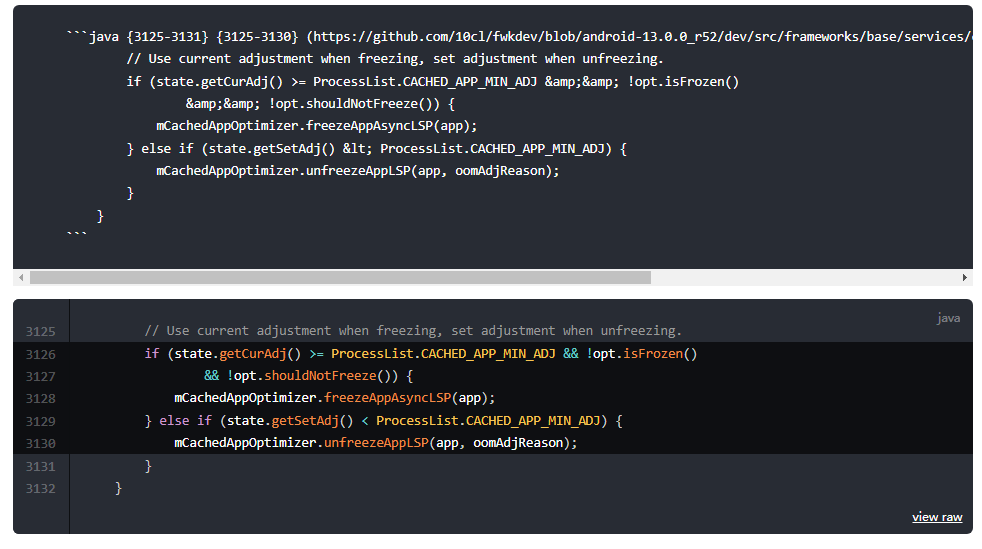
Currently, all developed features are open-source, aiming to promote traceable code.
# The Significance of SourceCodeTrace
The name "SourceCodeTrace" conveys the following meanings:
- Traceability of Source Code: Emphasizing the tracking of the source code's origin, history, and evolution to ensure its credibility and traceability. This may include the source introduction, version control, modification history, and more.
- Tracing Code Sources: Focusing on tracing the sources of code to ensure proper recognition and attribution of the code's original authors. This may involve code citations, introducing author information, compliance with open-source licenses, and more.
- Code Tracing: Highlighting the origin of code, which can be traced back to specific projects, libraries, teams, or individuals. This helps understand the context, purpose, and underlying design principles of the code.
By choosing "SourceCodeTrace" as the organization's name, you convey the importance of traceable source code. The organization can dedicate itself to promoting the design and practice of code block sources, advocating for code credibility, traceable origins, and respecting the rights of original authors. This contributes to establishing a development and collaboration environment that values code reliability and intellectual property.
# Logo Design

A possible logo design for the SourceCodeTrace organization:
Logo design:
- Symbol: Use a concise and powerful symbol to represent SourceCodeTrace. You can try combining elements of code and tracing, such as puzzle pieces, arrows, or magnifying glasses, to illustrate the concept of tracing source code.
- Font: Choose a modern and clear font that makes the organization name "SourceCodeTrace" easily recognizable.
- Colors: Select colors associated with code, such as deep blue, green, or gray, to convey professionalism, reliability, and technicality. You can use gradients or different shades to enhance visual appeal.
Example logo design description: The logo design for SourceCodeTrace is a simple and modern symbol. The core element of the symbol is a graphic composed of puzzle pieces and arrows, representing the tracing and tracking of source code. The direction of the arrow indicates that SourceCodeTrace is committed to guiding and promoting the design of code block sources. The font uses a clear and straightforward sans-serif typeface to highlight the organization name "SourceCodeTrace." Regarding colors, we chose deep blue as the primary tone, combined with a light blue gradient effect to convey professionalism and reliability.
Please note that this is just an example logo design description. You can adjust and modify it according to your preferences and needs. When designing a logo, ensure that it aligns with your organization's values and promotional objectives, and strive for simplicity, recognizability, and uniqueness. Most importantly, ensure that the logo remains clear and visible in different sizes and backgrounds. If further design or modifications are needed, consider consulting a professional graphic designer or using online logo design tools to realize your ideas.
# How to Promote the Organization
To promote your organization and spread its ideas, you can adopt the following strategies:
- Create a Website or Online Platform: Establish a dedicated website or online platform to introduce your organization's mission and purpose. Provide information, best practices, guidelines, and resources related to code block source design for developers and community members to reference and learn.
- Social Media Promotion: Utilize social media platforms such as Twitter, LinkedIn, Facebook, etc., to create social media accounts for the organization. Regularly post relevant content about code block source design, including viewpoints, practical tips, industry news, events, and activities, to attract followers and expand the organization's influence.
- (Weibo, Twitter)
- Write Blogs or Technical Articles: Write blog posts or technical articles about code block source design and publish them on personal blogs, technical platforms, or developer communities. By sharing insights, experiences, and best practices, you can attract readers' attention and spread the organization's ideas.
- (Write blog posts about source code analysis using this new standard, such as analyzing the AOSP source code.)
- Engage in Technical Communities and Events: Actively participate in technical communities, developer forums, and related industry events. Engage in discussions, answer questions, share experiences, and mention your organization and the idea of promoting code block sources. Build personal and organizational reputation and influence.
- (Share viewpoints and answer questions on platforms)
- Collaborations and Partnerships: Establish collaborations and partnerships with other organizations, communities, or individuals to jointly promote code block source design and practice. Collaborations can include co-hosting events, co-writing articles, or developing tools to spread the organization's ideas.
- Education and Training: Provide education and training on code block source design and best practices. Organize webinars, workshops, training courses, etc., to impart relevant knowledge and skills to developers and the technical community.
- (Create some videos to introduce source code analysis)
- Open Source Projects and Tools: Develop open-source projects or tools to facilitate code block source design and practice. Through the use and contributions to open-source projects, promote the organization's ideas and gain more exposure and support.
- (JetBrains IDE plugins, Sublime plugins, Vuepress plugins) Combine these strategies according to your resources and target audience to create a comprehensive promotion plan. Consistently provide valuable content, actively engage with the community, and build good cooperative relationships to expand the organization's influence and disseminate its ideas.
# The Significance of Promotion
Promoting code block source design and spreading related ideas is meaningful for the following reasons:
- Enhancing Code Credibility: Specifying the source of code blocks increases their credibility. When readers know the code's source and can trace its history and evolution, they have more confidence in using and referencing the code.
- Protecting Intellectual Property: By promoting code block source design, emphasis is placed on respecting and recognizing the code's authors and original sources. This helps protect intellectual property and encourages developers to comply with open-source licenses and copyright regulations.
- Facilitating Collaboration and Sharing: Clearly identifying code block sources promotes collaboration and sharing among developers. Developers can more easily find and reference others' code, fostering knowledge exchange and cooperation.
- Improving Code Maintainability: Understanding the source of code blocks contributes to better code maintainability. When modifications, bug fixes, or new features are needed, knowing the code's source helps better understand its design intent and dependencies.
- Building Community and Contribution: Promoting code block source design can contribute to the development and contributions of technical communities. By sharing best practices, providing tools and resources, it encourages communication and mutual growth among developers.
While promoting code block source design may require effort and time, it is significant for improving code quality, protecting knowledge, and building a vibrant community. By spreading this idea, you can have a positive impact on developers and the technical community, and promote more reliable and sustainable software development practices.